AI in the Fashion Industry and Local Brands: How to Put Together a Collection Lookbook

Launching a new collection for a local clothing, footwear, or accessories brand is always stressful and involves significant financial costs. In the past, producing a high-quality lookbook required going through a complex production cycle: renting a studio, organizing an on-location shoot, hiring a photographer, stylist, makeup artist, and models, followed by retouching and processing hundreds of shots.
Artificial intelligence is completely changing the game. Today, local brands can create full-fledged, realistic commercial-grade lookbooks right on their work computers, using product catalog photos and neural networks.
In this article, we'll explore how to use modern tools for generating lookbooks using model and product references to create a professional photoshoot set while preserving cut details, fabric texture, and brand identity.
Why Should Local Brands Use AI to Generate Lookbooks?#
Creating visuals using artificial intelligence isn't a replacement for the creative process - it's a tool for optimizing resources.
-
Budget and time savings: A traditional photoshoot requires coordinating a team of 5-8 people and takes anywhere from a week to a month (including preparation and post-production). Generating a lookbook using a neural network takes anywhere from a few hours to a couple of days, reducing the cost per frame tenfold.
-
Endless Locations and Concepts: Want to shoot on the streets of Tokyo, in the snow-covered Alps, in a stylish minimalist studio in Milan, or on the coast at sunset? For AI, there are no geographical limitations. You no longer need to travel to a location or build complex sets.
-
Adaptation for Marketplaces and Social Media: The same lookbook can be easily adapted for different purposes: a vertical format for social media, a clean studio background for product listings on marketplaces, and atmospheric shots for a website's homepage.
How Dual-Reference Generation Technology Works (Product + Model)#
The main problem with early generations of AI in fashion was that the neural network would "reinvent" the clothing or severely distort the actual cut and pattern.
Modern algorithms operate on the principle of dual references (Multi-Control / Image-to-Image with precise object transfer):
-
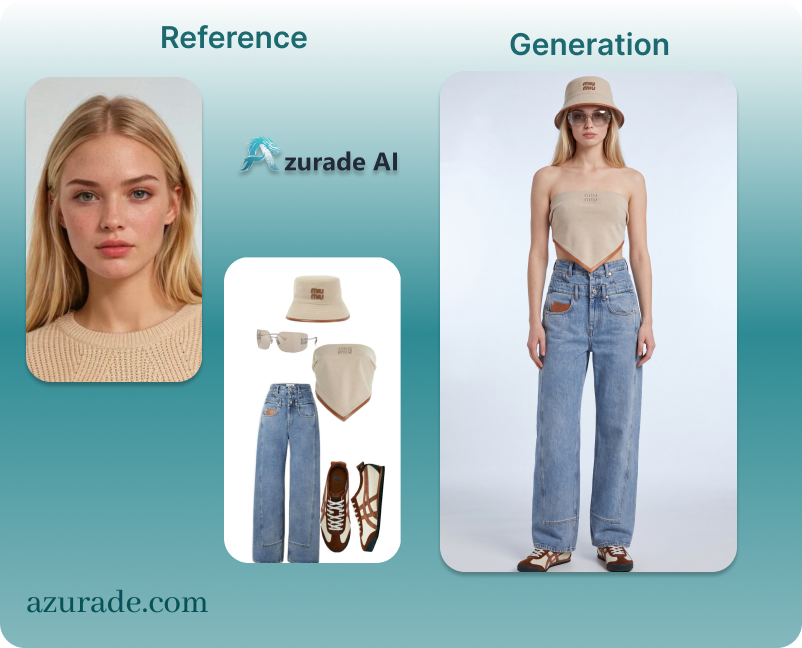
First Reference (Product): A studio photograph of your item (on a mannequin, hanger, or display). The neural network analyzes the texture, silhouette, colors, prints, and hardware.
-
Second Reference (Model / Pose): An image showing the model's appearance, color type, pose, or overall mood of the shoot.
-
Prompt and Text Script: Instructions for the AI describing the lighting, location, camera angle, and exactly how the clothing should fit the model.
Creating a Collection Lookbook Without a Photoshoot#
Step 1. Preparing Source Photos (Product Photos)
To ensure the AI accurately renders your clothing or accessories, prepare your product photos carefully:
-
Take photos under good, even lighting.
-
Avoid harsh shadows and deep folds unless they are part of the item's design.
-
Use a neutral (white or gray) background.
Step 2. Selecting a Model Reference
Choose a photo of a model whose facial features, body type, and aesthetic align with your brand's positioning. This can be a real photo from a previous shoot or a previously generated AI avatar.
Step 3. Crafting the Right Text Prompt
Structure is key when composing prompts:
-
Subject: Who is depicted (model, age, appearance, pose).
-
Clothing Item: A detailed description of the item, referencing a specific example.
-
Location and Background: Surroundings, architecture, interior.
-
Lighting: Studio softbox, natural sunlight, contrasting shadows.
-
Camera and Style: Angle (close-up, full-body shot), 35mm, fashion photography, magazine style.
Examples of Prompts for Generation#
Below are ready-made prompt templates in Russian that you can adapt to your references.
1. Studio Minimalism (Full-Body Shot)
-
Shot objective: A clean, stylish shot for catalog and lookbook.
-
Prompt: A female model poses naturally in a full-length shot against the backdrop of a bright, minimalist photo studio. The model is wearing clothing that exactly matches Reference 1 (product), fully maintaining the cut, color, and fabric texture. The model's face and appearance exactly match Reference 2 (model). Soft, diffused studio lighting, professional fashion shoot for a glossy magazine, sharp details, realistic textures, 8K resolution, photo taken with a Hasselblad.
2. Urban Street Style (Medium Shot)
-
Purpose of the shot: To simulate the atmosphere of an on-location shoot on city streets.
-
Prompt: A female model is walking down a sunny Parisian street against a backdrop of Habsburg-style architecture. Dynamic pose in motion with wind blowing through hair. The model is wearing the product exactly as shown in Reference 1 (product), with precise rendering of seams and fabric. Appearance and facial features match Reference 2 (model). Natural daylight, slight background blur (bokeh), street fashion style, professional magazine-style editing, modern model pose, emphasis on the product, eye-catching photo.
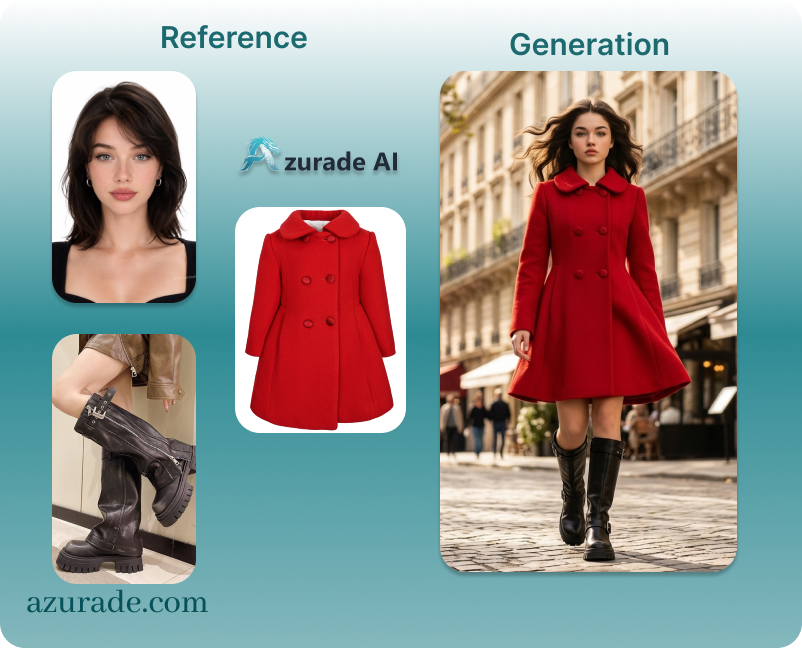
3. Details and Accessories (Close-Up)
-
Purpose of the shot: Focus on shoes, bags, or jewelry.
-
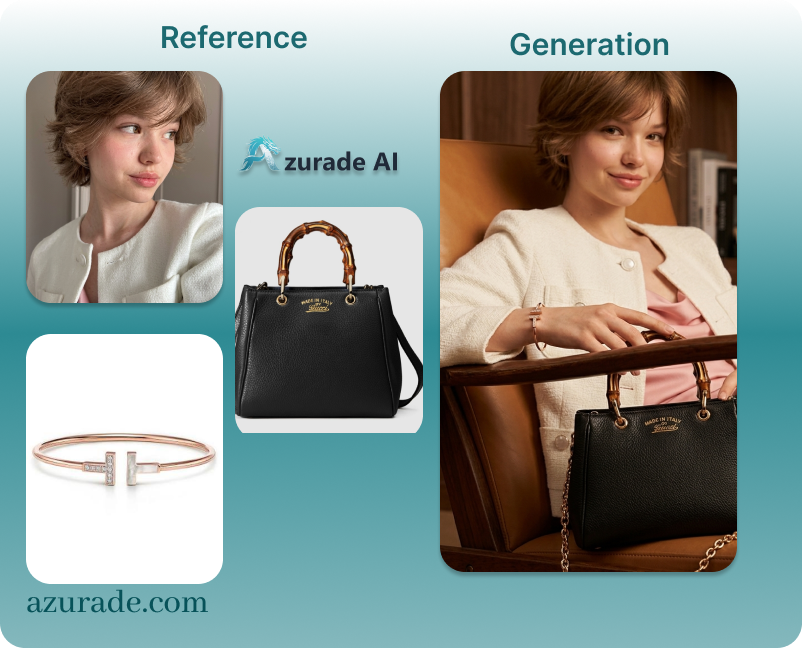
Prompt: Close-up, focus on details. The model is sitting in a stylish designer chair. The accessory/bag/shoes exactly match Reference 1 (product) in terms of leather texture, hardware, and shade. The model's hands and silhouette match Reference 2 (model). Warm, intimate lighting, premium brand aesthetic, highest level of detail in materials, emphasis on the product.
Common Mistakes and How to Avoid Them#
-
Low quality of the source product reference: If the product photo is blurry or taken in poor lighting, the neural network won't be able to correctly interpret the texture.
-
Overloaded prompts: Don't try to describe absolutely everything in a single sentence. Focus on key elements:
product + model + lighting + location. -
Ignoring proportions: Make sure the AI accurately captures how clothing fits the body. If necessary, refine the output using spot inpainting (painting over and regenerating specific areas).
Conclusion#
Artificial intelligence technologies open up enormous opportunities for local brands by lowering the financial barrier to entry for high-quality fashion production. By using the right combination of product references, model references, and a well-crafted prompt, you can create stylish, world-class lookbooks in a matter of hours.
Try creating a branded photo right now on Azurade! Discover a world of new content possibilities with our Azurade platform!
We're giving new registered users free credits for generating images.